Summarize this blog post with:


In this article, you’ll see what AirOps does well, where it strains, what its task-based pricing actually adds up to in a real content operation, and where its workflow builder stops being enough. You’ll also see how Analyze AI, the agentic SEO and content platform you’ll meet at the end, handles the same jobs with a wider set of nodes, a stricter content QA layer, and a pricing model your finance team can predict.
If you’re a content director shopping for a way to scale production, or a CMO looking at AirOps as your “Insights to Action” layer, you’ll leave with a clear answer to one question. Should you commit to AirOps, or buy something that does the same work plus the strategy and visibility layer underneath it.
Table of Contents
What AirOps actually is in 2026
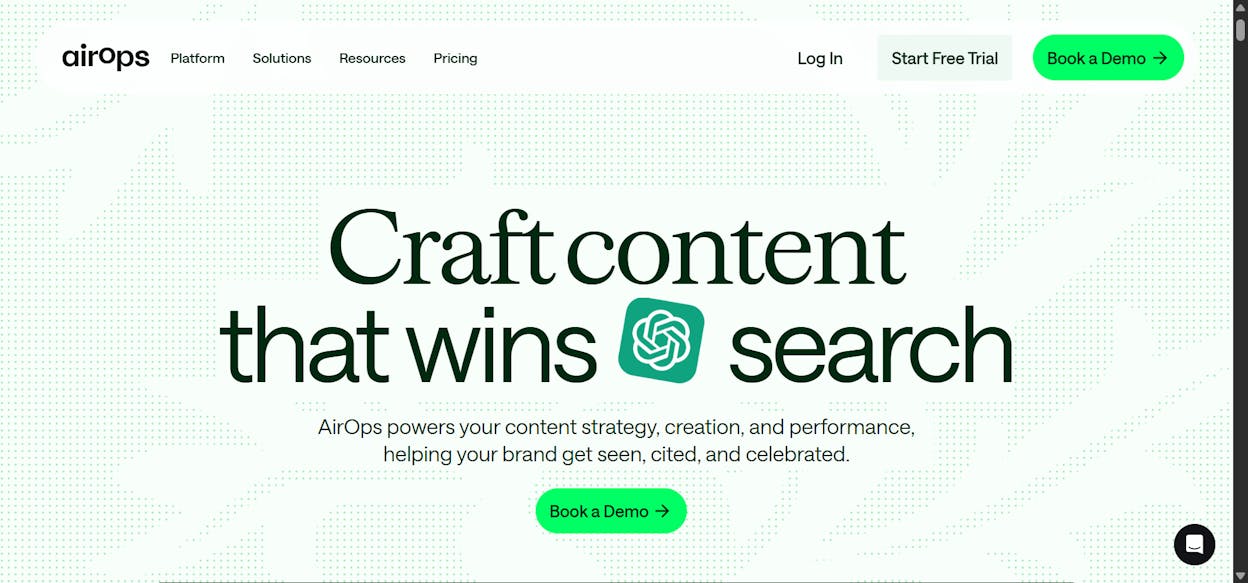
AirOps is a no-code workflow platform built for content and SEO teams that already have a process and want to scale it. The pitch is “content engineering,” which in practice means you compose multi-step pipelines, drop them into a Grids interface that looks like a spreadsheet, and run hundreds of articles through them with brand voice rules and human review gates baked in.
The customer list is real. Webflow, Chime, Ramp, Carta, LegalZoom, Apollo.io, Monday.com, Notion, HubSpot, and Brex all run AirOps in production. That kind of adoption is the strongest signal you can get when comparing modern content tools.
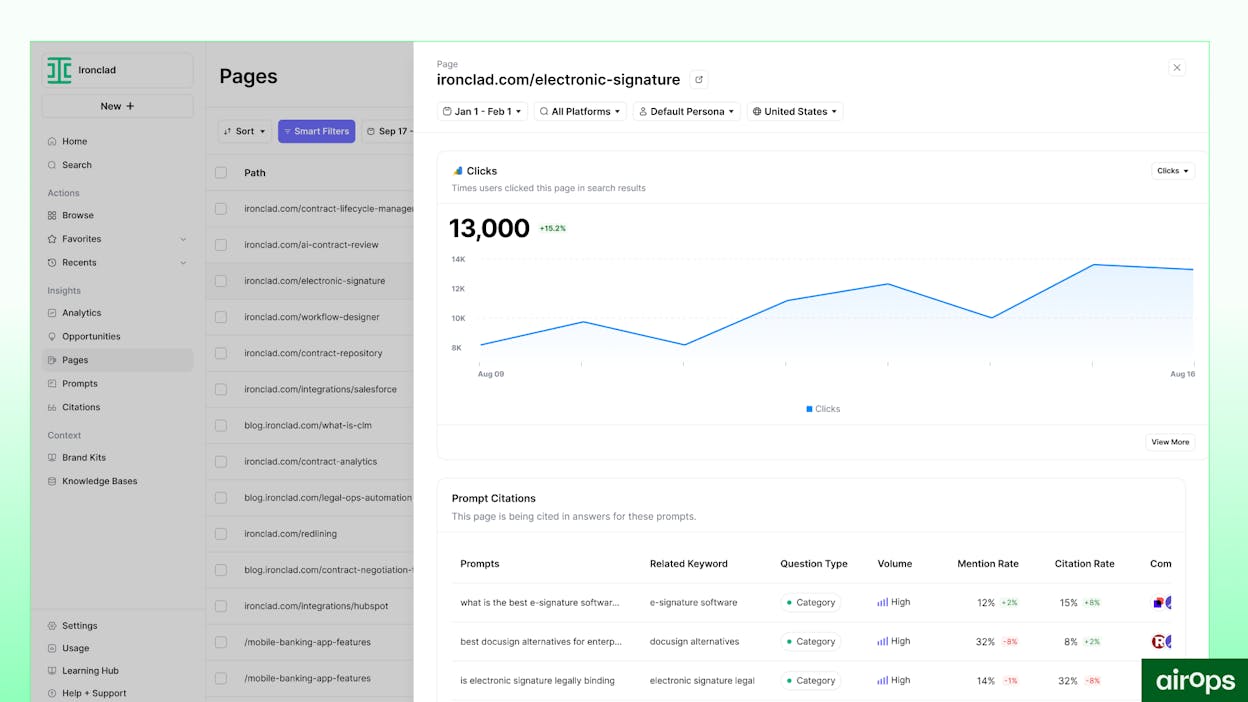
In late 2025, AirOps added an Insights layer on top of the Action layer it started with. The platform now ships Page360, Sentiment Tracking, and Query Fan-outs, which surface AI search visibility data alongside GA4 and Google Search Console signals. The goal is to keep teams inside one tool from “what’s losing citations” to “the refreshed page is published.”
That’s the headline. The reality is more interesting.
Three things AirOps genuinely does well
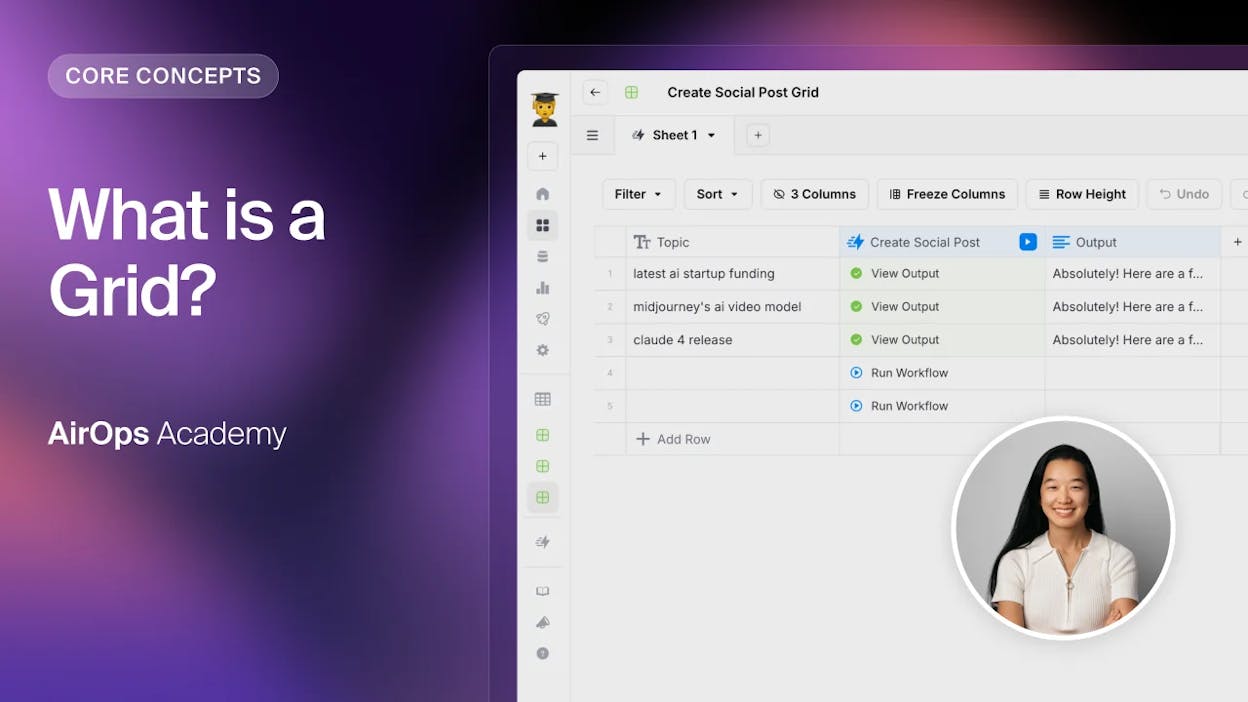
Grids turn a chaotic content calendar into a single live surface
The Grids interface is where AirOps earns its “content engineering” branding. Each row is an article, and each column is a workflow stage like research, brief, draft, optimize, QA, and publish. When you bulk-trigger a step across 30 rows, you can see exactly which pieces moved forward, which got flagged, and which are stuck waiting on review.
Without Grids, you stitch the same view together by hand across Notion, Slack, a brief doc, a tracking sheet, and a CMS. With Grids, every cell carries its own prompt history and version trail, so when an output looks off, you can trace it back to the exact input that shaped it.
The workflow builder gives you a real handle on AI quality
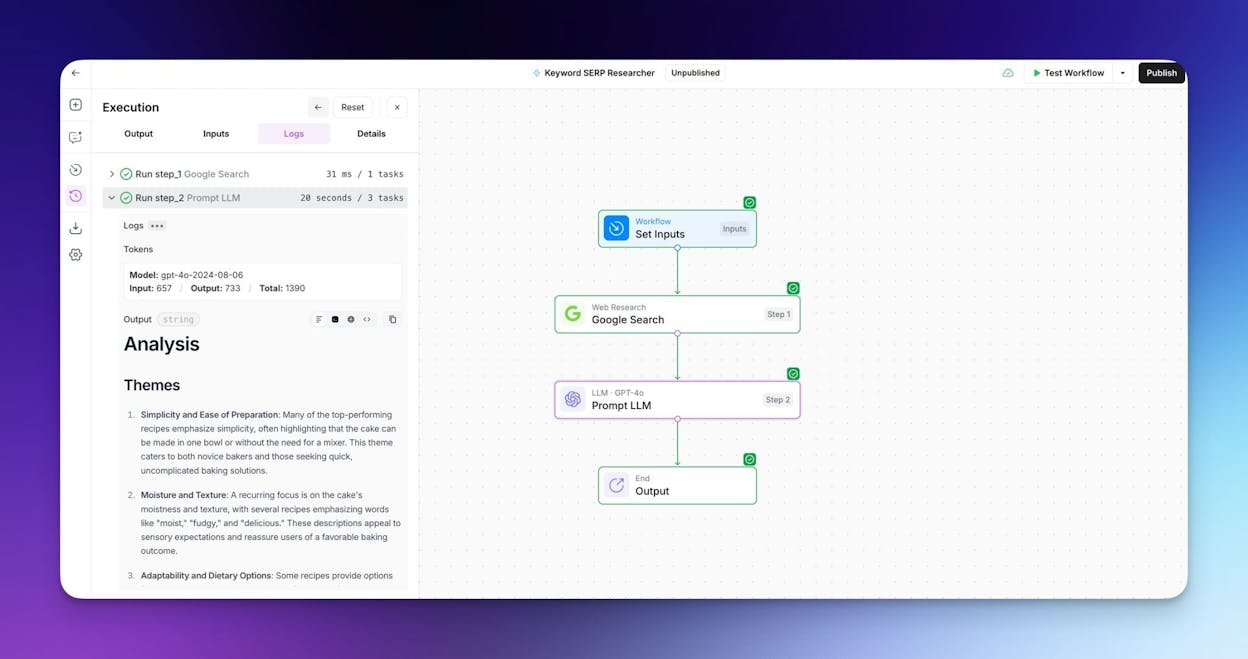
The Power Agents builder is a drag-and-drop canvas where you wire together steps like “scrape source,” “research keyword,” “generate outline,” “draft,” “fact-check,” and “review.” Each step exposes its model, temperature, system prompt, and validation rules, so you can tighten quality where it matters and loosen it where creativity helps.
The smart move is to build small, reusable modules. A metadata pass that handles slugs and meta descriptions. A tone alignment check. A claim verification pass. Once you have ten of these, you stop authoring full workflows from scratch. You compose them. The same logic underpins the content automation patterns mature teams use across any modern stack.
Brand Kits keep your tone consistent at volume
Brand Kits and Knowledge Bases let you store tone, style rules, messaging pillars, product specs, and example pages in one place. Every workflow step that touches generation can pull from this store, so a draft written by AirOps reads like a draft written by your senior writer.
When messaging changes, you update the Brand Kit once and rerun affected workflows. AirOps re-runs the rewrite across every piece in the affected lane. What used to be a four-week rewrite sprint becomes a controlled refresh cycle.
Three trade-offs that show up in practice
The learning curve is steeper than the demo suggests
Every G2 review and every Reddit thread says the same thing. AirOps takes weeks before it feels logical. The early days involve outputs that overshoot, validation rules that block your flow, and grids that don’t refresh the way you expect.
The platform asks marketers to think like systems designers. You have to understand how data inputs, model parameters, and human review steps interact, which is not the mental model most content folks bring on day one. Teams that stick with it describe a “click moment” three to four weeks in. If you’re evaluating AirOps, budget two weeks of operator time before you draw any conclusions about output quality.
The pricing structure has a 10x jump with no middle step
This is the one that catches finance teams off guard. AirOps prices on tasks, not seats. Every model call, vector lookup, validation, and API request consumes tasks from your monthly bucket. A single article in a serious workflow runs 500 to 800 tasks. A 30-piece month runs 15,000 to 24,000 tasks.
The Solo plan covers 20,000 tasks, which sounds generous until you realize testing burns through tasks the same as production. Once you go over, overage is $0.025 per task. The next tier is Pro, which third-party reviews price at roughly $2,000/month. There is no middle option.
A two-person content team producing 30 articles a month often lands at $200 to $300 on Solo with overage, then jumps to $2,000 the month they need multi-engine AI insights or unlimited seats. That 10x cliff makes capacity planning awkward, especially for agencies billing on retainer.
|
Plan |
Approximate monthly cost |
What you get |
Where it breaks |
|---|---|---|---|
|
Solo (Insights free tier) |
$0 with 1,000 tasks |
One user, ChatGPT-only AI insights, basic templates |
Tasks run out within hours of real testing |
|
Solo (paid) |
~$200 starting |
20,000 tasks, 100 tracked prompts, ChatGPT insights only |
Overage at $9 per 1,000 tasks. No multi-engine AI insights |
|
Pro |
~$2,000 starting |
Multi-engine AI insights (ChatGPT, Gemini, Perplexity, Google AI Mode), unlimited seats |
Pricing not public. Sales call required |
|
Enterprise |
Custom |
Multi-region, multi-language, BYOK security, SSO, dedicated content engineers |
Locked behind procurement |
Performance and AI coverage degrade at the edges
AirOps feels fast at 50 rows. At 500, the same Grids interface starts to lag. Clicks queue. Heavy generation steps stall. Teams plan around it by scheduling big batches off-hours, which works, but it changes how collaboration feels.
Two coverage gaps matter more for AI search work. The Solo plan tracks ChatGPT only. If you care about AI visibility across Perplexity, Claude, Copilot, and Gemini, you’re on Pro at $2,000/month or higher. The Insights data is also US-centric below Enterprise, so global teams hit a regional ceiling that takes a custom contract to lift.
So, is AirOps worth it for your team?
You should buy AirOps if you publish 20+ articles a month, have a working playbook, have technical fluency on the team, and your bottleneck is execution. The Pro tier pays for itself by replacing two to three hours of weekly glue work per writer.
You should not buy AirOps if you’re still figuring out which prompts and topics matter, you don’t have someone to own workflow design, you need predictable monthly costs, or you want one tool that handles SEO research, AI search visibility, content production, and reporting without forcing you to build pipelines for each. If the second list describes you, the next section is about a platform that solves the same job from the other direction.
Analyze AI: the agentic SEO and content platform that does the work, not just the tracking
Most teams hear “AI search visibility tool” and picture a dashboard. A score saying you appeared in 73% of Perplexity responses last week, and a recommendation to publish more content.
Analyze AI is the opposite shape. It’s an agentic SEO and content platform that includes visibility tracking, then layers on a production engine, an optimization engine, and an agent builder pre-wired to GA4, Google Search Console, DataForSEO, Semrush, HubSpot, and your CMS. Visibility data is one thing the system can pull. The agent builder turns that data into a published, on-brand, internally linked, fact-checked refresh.
Analyze AI isn’t an alternative to AirOps because it tracks AI search. It’s an alternative because it does the same content engineering work, with a stricter writing methodology, simpler pricing, and a programmable substrate that reaches further into the marketing stack. Here’s how that plays out across the four pieces of the workflow.
A Content Writer that researches before it writes
Most AI writers jump from topic to 1,500-word draft, which is why most AI drafts read like a structured Wikipedia paragraph. The Content Writer inside Analyze AI breaks the job into four stages. Ideation. Research. Outline. Draft. Each stage is its own checkpoint where you or your editor can intervene before the next stage runs.
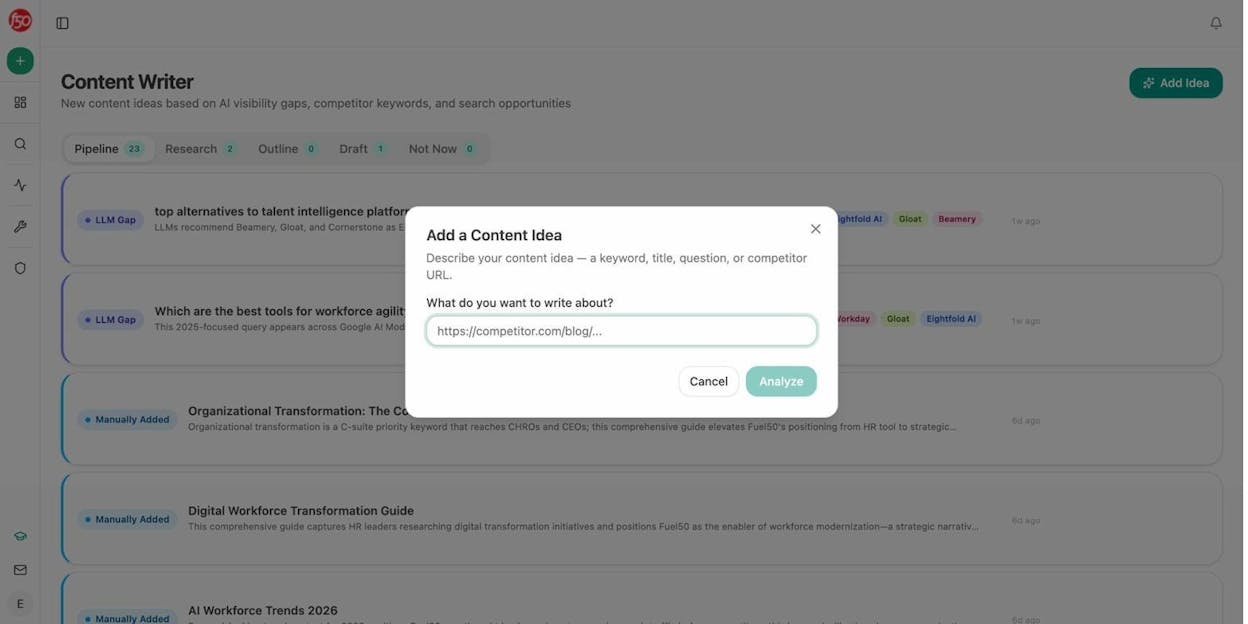
The pipeline starts with the idea. The Content Writer surfaces content ideas pulled from your real LLM gaps, competitor keyword wins, and search opportunities, so you start each piece with a concrete reason to write it.
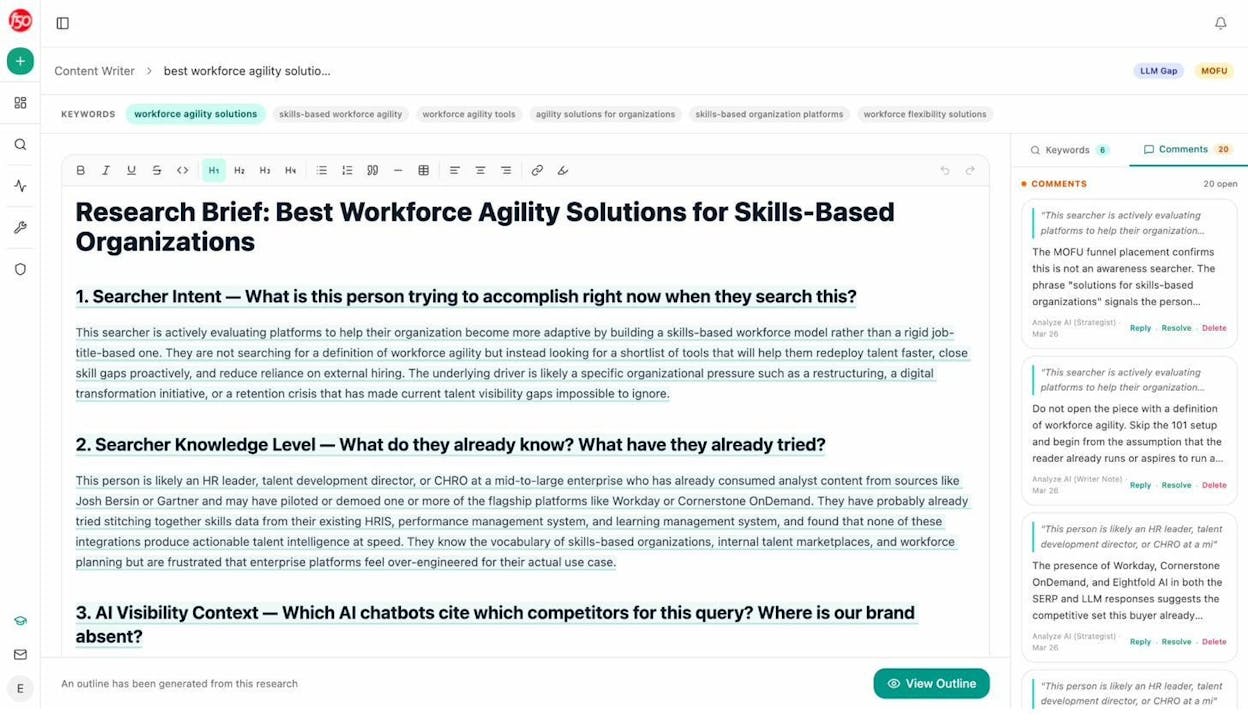
When you click into an idea, the Content Writer pulls live SERP data, drafts a thesis, and lays out a research plan. You comment on the thesis the way you’d comment in Notion, and the system rewrites until you approve.
The outline that comes next isn’t a generic H2 list. It’s structured around an editorial point of view, which is the difference between a draft you publish and a draft you rewrite.
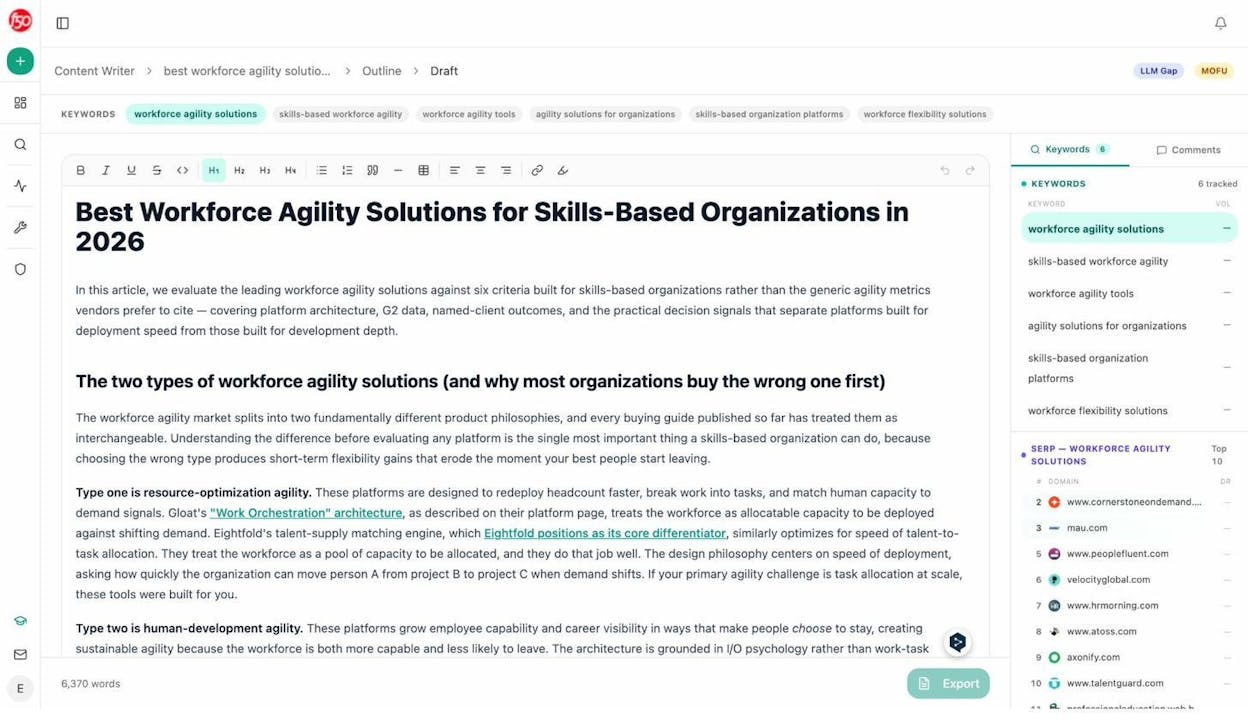
By the time the system generates the full draft, your point of view, your sources, your keyword targets, and your internal links are baked in. Word counts often land in the 4,000 to 6,000 range with strong original takes, not keyword-stuffed paragraphs.
A Content Optimizer with QA gates that verify claims
The Content Optimizer handles the work AirOps calls “content refresh,” and it’s where the methodology gap shows up most clearly. You add a declining or underperforming page, and the system fetches the live content, reads it, and lays out the gaps next to it.
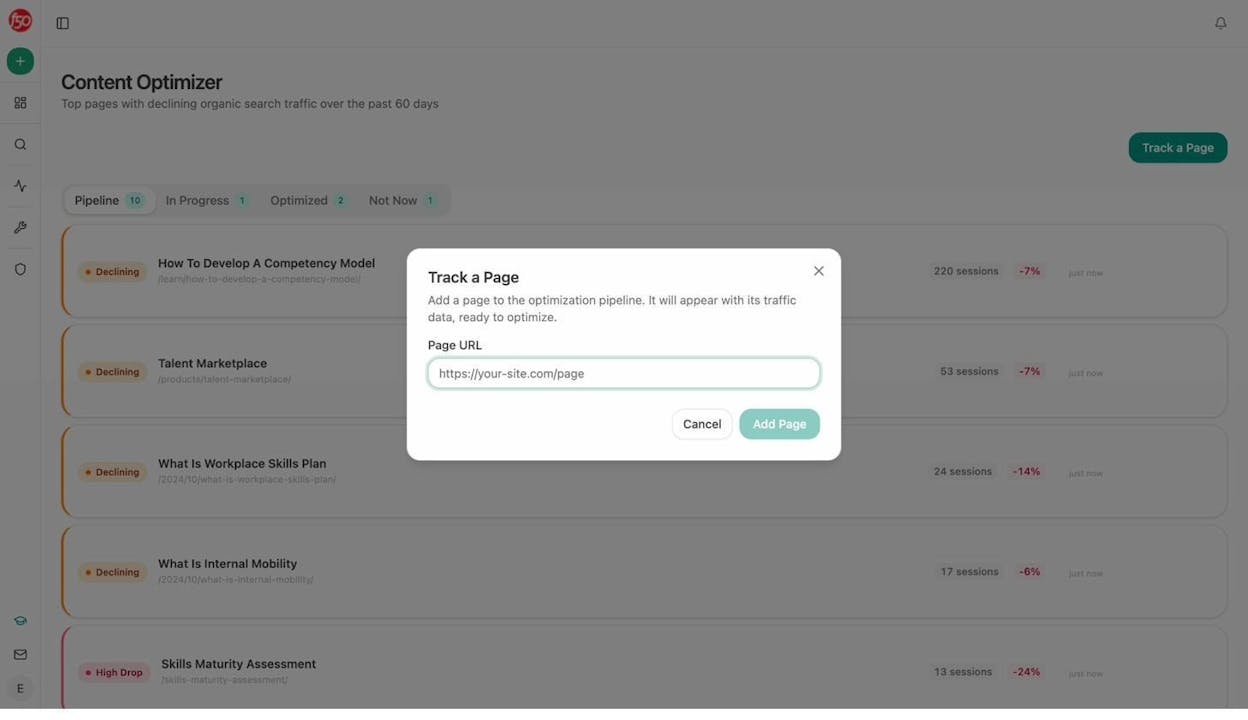
The optimizer doesn’t just rewrite. It scores. Every optimized draft runs through an internal QA Report that grades the piece on a 0-100 scale, verifies every numeric and named claim against a source, counts internal and external links found versus expected, and flags anything that doesn’t pass.
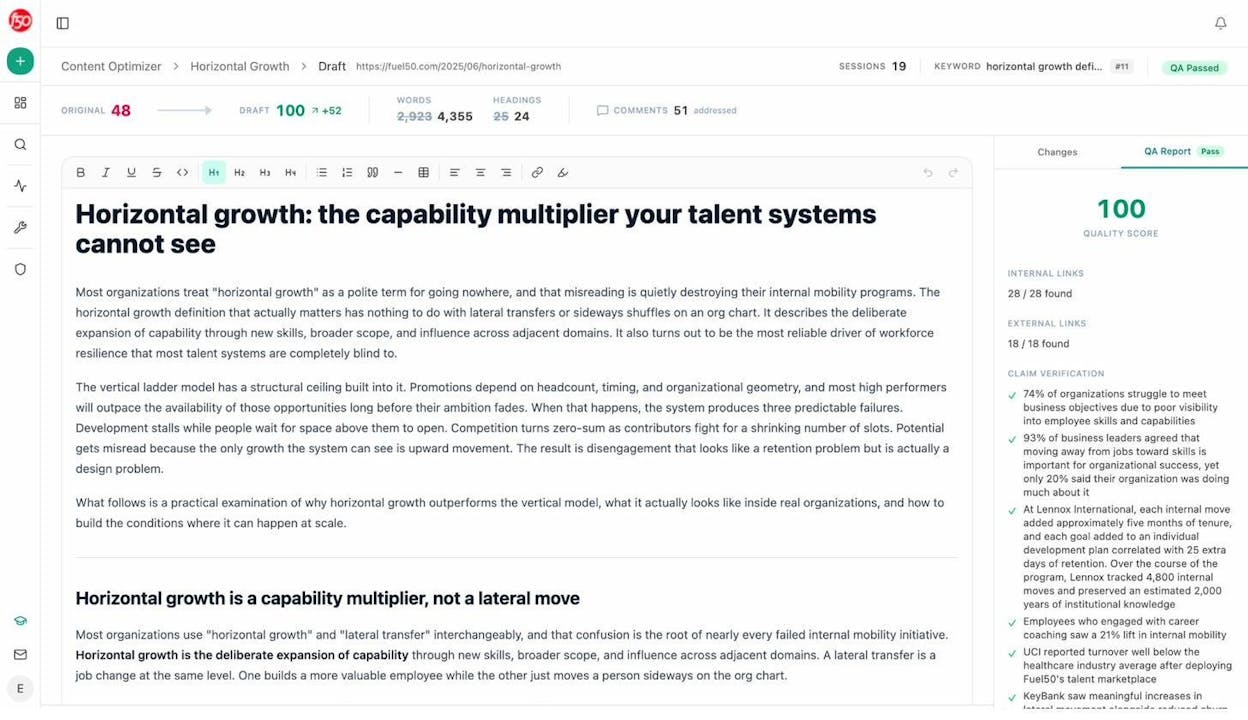
A draft that scores 100 has 28 of 28 internal links present, 18 of 18 external links present, and every numeric claim verified. AirOps’ Brand Kits keep tone consistent. Analyze AI’s QA Report keeps facts consistent. For pages that drive trial signups or sit on bottom-of-funnel keywords, that second layer protects conversion when you scale. More on the methodology in the Content Optimization complete guide.
An Agent Builder with 180+ nodes wired to your full marketing stack
This is the piece that gets buried in most reviews. The Agent Builder inside Analyze AI is a programmable substrate with 180+ nodes, 34 pre-built data recipes, and three trigger modes (manual, scheduled, webhook). The composability matches what you’d get from stacking n8n, Zapier, Make, and Retool, except the data is already in the room.
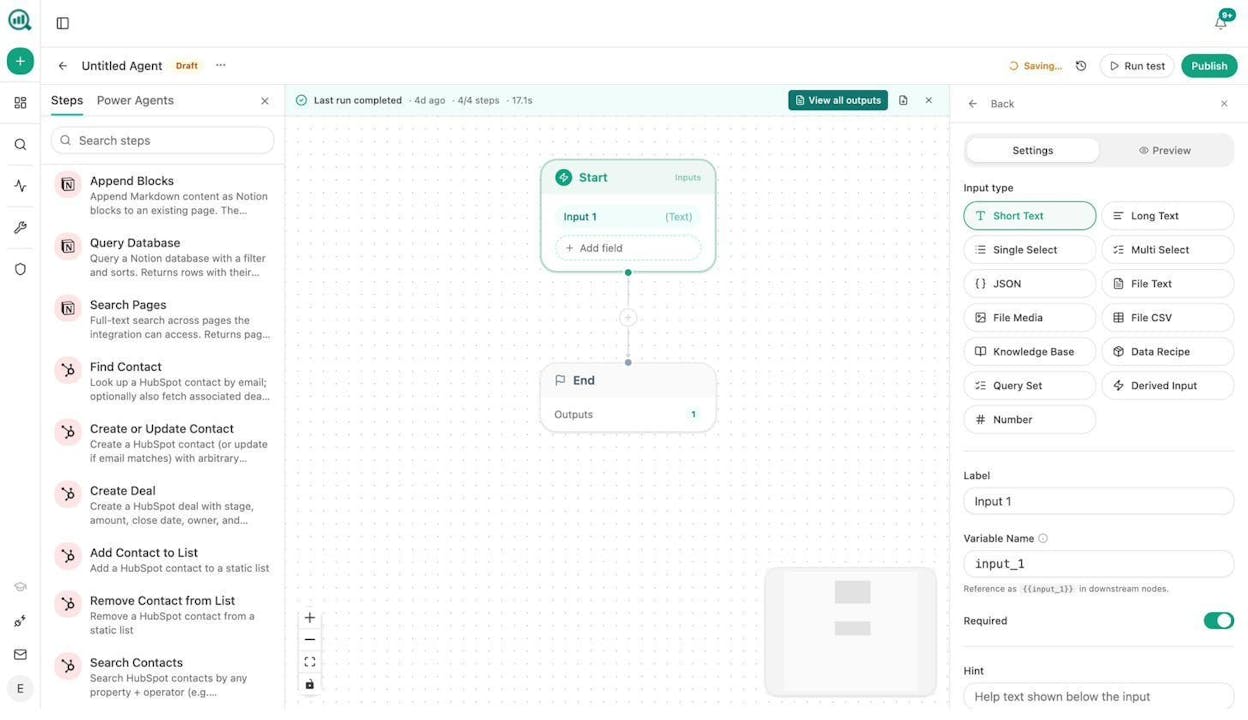
Nodes cover Google Search Console, GA4, DataForSEO, Semrush, HubSpot, Mailchimp, Hunter, Tomba, Notion, WordPress, Sanity, Contentful, Exa, Perplexity, Claude, GPT, Gemini, and more. AirOps Power Agents handle a slice of this. The Analyze AI Agent Builder handles the slice plus the marketing operating system around it.
A short list of what teams actually build:
-
Monday board prep agent. Scheduled for 7am Monday. Pulls share of voice, AI traffic from GA4, GSC top movers, and HubSpot deal flow. Drafts an executive summary. Emails leadership. Replaces a four-hour analyst chase.
-
Editorial calendar autopilot. Scheduled Sunday night. Pulls uncovered prompts from the last 14 days plus rising keyword opportunities. Drops a populated Notion calendar with one card per piece.
-
Brief-to-publish pipeline. Webhook from Notion when a brief flips to “approved.” Generates research, outline, and draft. Runs the AEO Content Scorecard. If score is above 80, publishes to WordPress. If below, Slacks the writer with the gaps.
-
Content refresh fleet. Scheduled weekly. Identifies stale pages, scrapes the live URL, rewrites for AI Engine Optimization, diffs the change, and updates WordPress if substantive.
-
Crisis early warning. Scheduled every 15 minutes. Watches Brand Mentions and News. If sentiment drops and reach exceeds threshold, Slacks the team with a draft response.
-
Closed-won to case study draft. Webhook from HubSpot when a deal flips to closed-won. Pulls deal notes, researches the company, drafts a case study, lands a Notion draft for legal review.
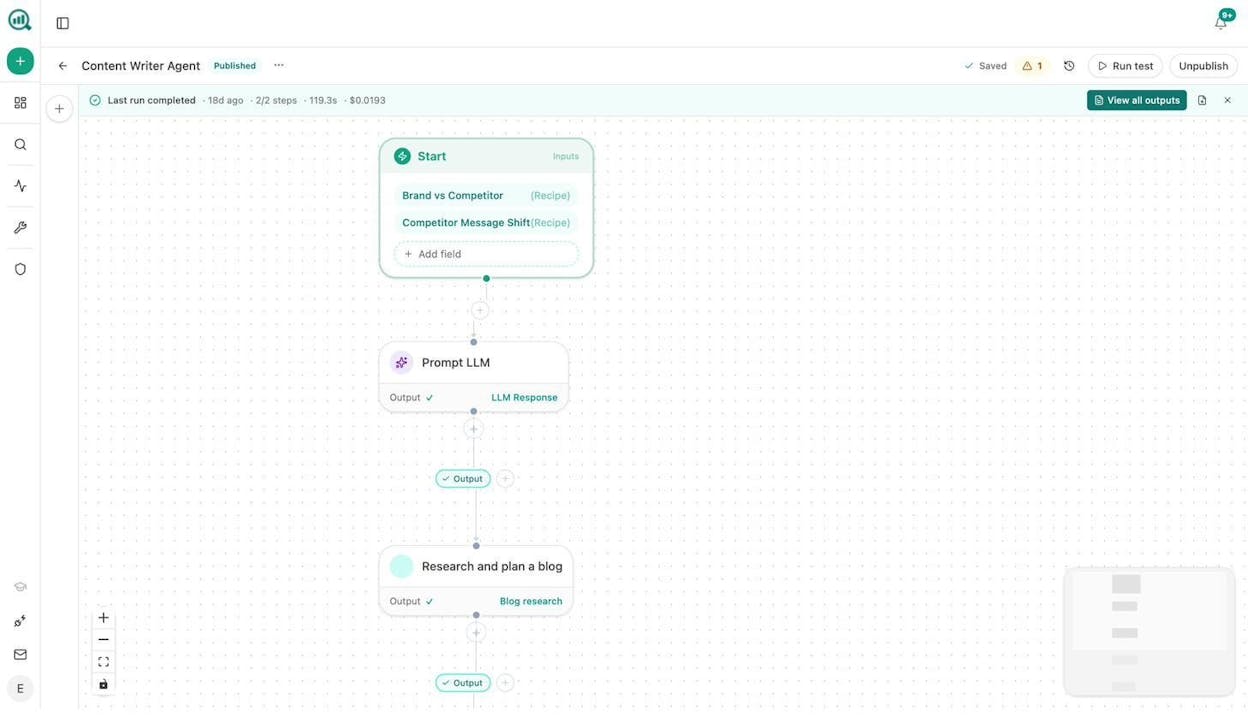
If you’ve ever priced marketing automation tools separately from your SEO and content stack, you already know how much each integration costs in glue work. The Agent Builder eliminates the glue.
AI search visibility as one input, not the whole product
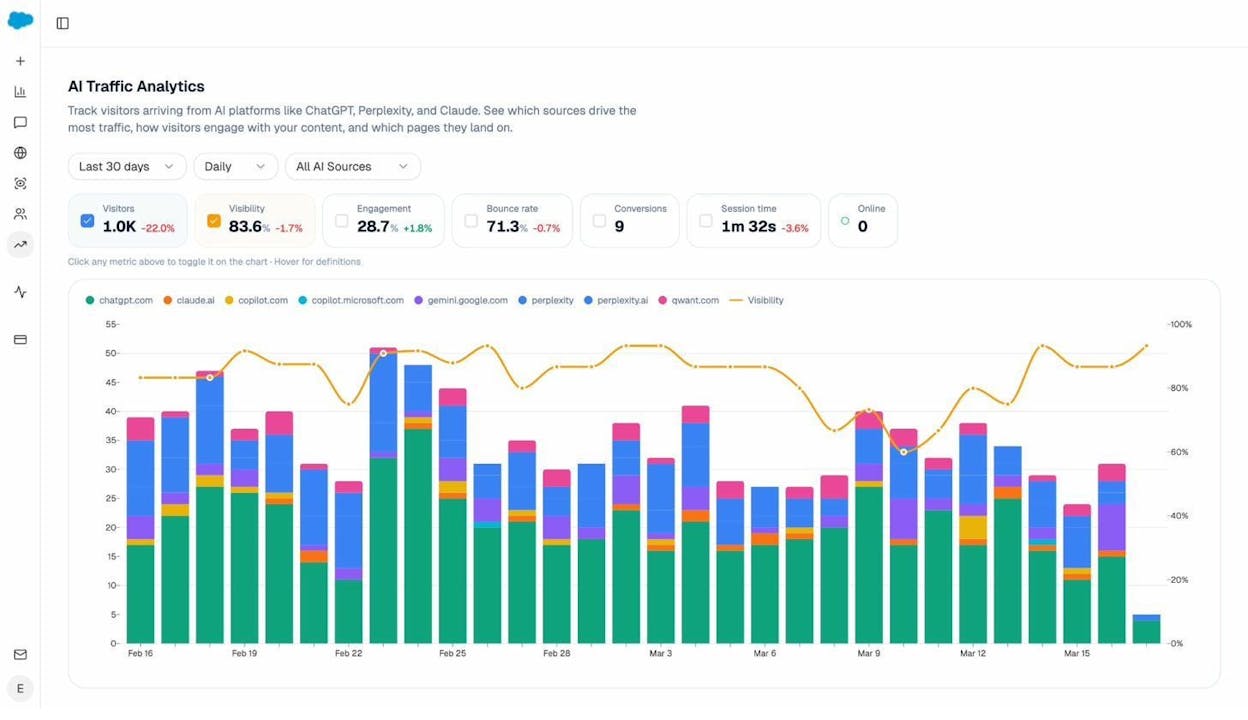
The AI search analytics layer is still here, and it’s the strongest in category. You see AI referral traffic by engine (ChatGPT, Perplexity, Claude, Copilot, Gemini), the pages those visits land on, and the conversions they drive.
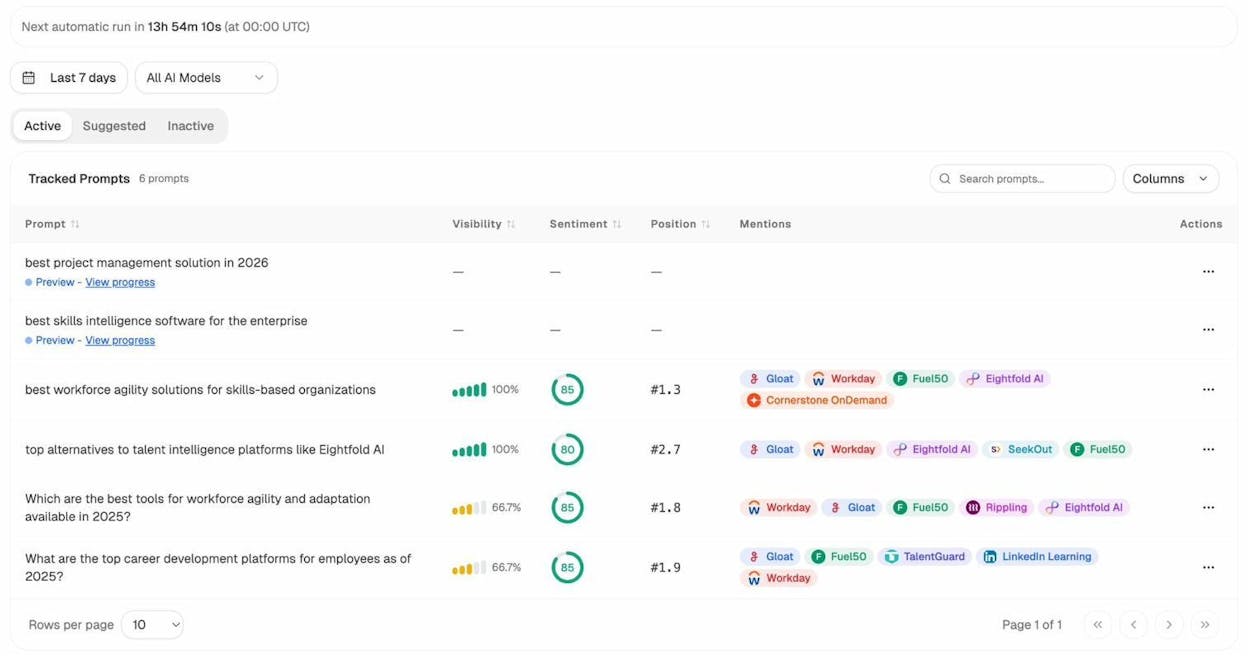
You track prompts you care about with visibility, sentiment, and competitive position across every major LLM.
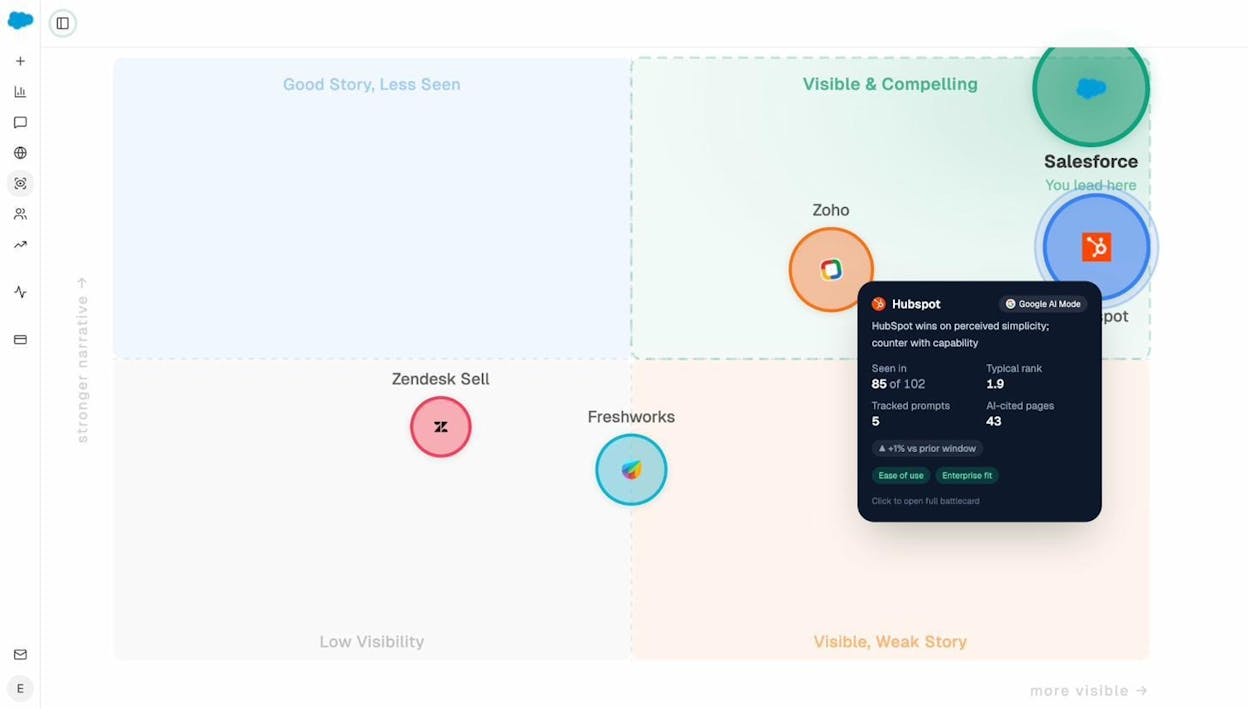
You audit the sources AI models cite so you know which domains shape answers in your category, and you watch the perception map shift as your work compounds.
The difference is that this data feeds the agent builder, the writer, and the optimizer. A prompt where your visibility drops 18 points last week doesn’t sit in a dashboard. It triggers the Monday agent, which drafts a counter-content brief, feeds the Content Writer, produces a draft, runs through the Optimizer’s QA gate, and gets published. That loop is what “agentic SEO and content platform” means in practice.
How Analyze AI compares with AirOps, side by side
|
Capability |
AirOps |
Analyze AI |
|---|---|---|
|
Content production |
Power Agents and Grids |
Content Writer with research → outline → draft, comment-driven editing at every stage |
|
Content optimization |
Templates and refresh workflows |
Content Optimizer with QA Report (0-100 score, claim verification, link audit) |
|
Workflow / agent builder |
Drag-and-drop, content-first nodes |
180+ nodes, 34 data recipes, three trigger modes, GSC/GA4/DataForSEO/Semrush/HubSpot pre-wired |
|
AI search visibility |
ChatGPT only on Solo, multi-engine on Pro+ |
ChatGPT, Perplexity, Claude, Copilot, Gemini, Google AI Mode on every plan |
|
Pricing model |
Task-based with overage, opaque above Solo |
Predictable plan tiers, public pricing |
|
Trigger modes for agents |
Manual and scheduled |
Manual, scheduled, webhook (HMAC-signed) |
|
QA layer |
Brand Kit consistency |
Brand Kit consistency plus claim verification and internal/external link auditing |
The clearest read in one line. AirOps is a content-engineering platform that recently bolted on AI search visibility. Analyze AI is an SEO and content platform built around AI search visibility, with the agent builder and writer/optimizer engineered as first-class citizens from day one.
Pressure-test before you commit
To see how Analyze AI handles the work AirOps charges $2,000/month for, start with one tracked prompt and the free tools. The Keyword Difficulty Checker, SERP Checker, and Keyword Rank Checker cover the SEO research layer. The Website Traffic Checker gives you a competitor’s full picture, and the Broken Link Checker audits your own pages before you push them through the Optimizer.
Most teams who arrive from an AirOps trial run one tracked prompt for a week, watch the Content Writer produce a research-backed draft, push an underperforming page through the Optimizer, and see the QA score jump from 48 to 100. That’s enough signal to know whether this is the right shape of platform for the way your team works.
The honest summary
AirOps is a serious tool for serious content teams. The Grids interface, the Power Agents builder, and the Brand Kit layer are real, and the customer logo wall is earned. If your only job is to scale a content playbook you’ve already validated, you can buy AirOps and ship.
The questions to ask before you sign:
-
Is your bottleneck actually production speed, or is it strategy and visibility data?
-
Can you absorb a 10x pricing jump from Solo to Pro the month you need multi-engine AI insights?
-
Do you have someone who will own workflow design, prompt engineering, and task-budget management?
-
Are you fine with a tool that requires another tool underneath it for full GSC, GA4, DataForSEO, and HubSpot integration?
If any of those answers are “no,” Analyze AI is the platform built for what comes next. The same content engineering. The same brand voice consistency. Plus the visibility data, the agent builder wired to your stack, and a writer/optimizer pipeline with a QA gate.
See it for yourself on a workspace your team can keep.

Ernest

Ibrahim


![7 LLMrefs Alternatives That Do More Than Track Mentions [2026]](/_next/image?url=https%3A%2F%2Fwww.datocms-assets.com%2F164164%2F1779313840-blobid0.png&w=3840&q=75)